
GTA San Andreas System Requirements PC – Can Your PC Run It ?+ Definitive Edition
Grand Theft Auto: San Andreas remains one of the most iconic open-world games ever created by Rockstar Games—and the best part is, it still runs smoothly on low-end PCs even in 2026. Whether you are using an old laptop, a basic desktop, or a modern system, many players are surprised by how easily GTA San Andreas performs compared to newer games.
If you are wondering, “Can my PC run GTA San Andreas?”, you are in the right place. In this complete guide, we will break down the minimum and recommended system requirements, explain how the game performs on low-end hardware, and show you how to run it smoothly on Windows 10 and Windows 11.
Unlike many modern titles that demand high-end GPUs and large amounts of RAM, GTA San Andreas was designed with lightweight system requirements. This means even a PC with 2GB RAM, basic graphics, and an older processor can handle the game without major issues. That is exactly why it is still one of the best low-end PC games today.
We will also cover important details like:
- How much storage space does the game require
- Whether you need a graphics card
- Best settings for smooth gameplay on low-end PCs
- Compatibility with modern systems
By the end of this guide, you will know exactly whether your PC or laptop can run GTA San Andreas—and how to get the best performance out of it.
What Do System Requirements Mean?
System requirements tell you what kind of PC hardware is needed to run a game includes things like your processor (CPU), RAM, graphics card, storage space, and operating system.
Every game has two types of requirements:
- Minimum requirements → the game will run, but performance may not be smooth
- Recommended requirements → the game runs properly with better graphics and stable performance
In simple terms, system requirements help you understand whether your PC is capable of handling the game or not.
Why System Requirements Are Important Before Downloading a Game
Checking system requirements before downloading a game can save you from a lot of frustration.
If your PC does not meet the requirements, you may face issues like the game not opening, lagging during gameplay, or crashing frequently. On the other hand, if your system meets the recommended specs, you will get a much smoother and better experience.
It also helps you avoid wasting time and internet data on downloading a game that your PC cannot run. For games like GTA San Andreas, the requirements are very low, but it is still a good idea to check so you know exactly what to expect.
GTA San Andreas System Requirements PC
GTA San Andreas has very low system requirements compared to modern PC games, which is why it runs smoothly on older computers as well as basic laptops. Understanding both minimum and recommended requirements helps you decide whether your system can handle the game and what kind of performance you can expect.
Below is a complete breakdown of the hardware requirements for running GTA San Andreas on PC.
| Component | Minimum Requirements | Recommended Requirements |
|---|---|---|
| CPU (Processor) | 1 GHz Intel Pentium III or AMD Athlon | Intel Pentium 4 or AMD Athlon XP |
| RAM | 256 MB | 2GB or higher |
| Graphics Card (GPU) | 64 MB (NVIDIA GeForce 3 or equivalent) | 128 MB (NVIDIA GeForce 6 series or better) |
| Storage Space | 3.6 GB free disk space | Up to 4.7 GB free disk space |
| Operating System | Windows 2000 / Windows XP | Windows XP or higher |
| DirectX | DirectX 9 compatible | DirectX 9.0c |
| Sound Card | DirectX compatible | DirectX compatible |
| Other | Keyboard and mouse | — |
Can I Run GTA San Andreas on My PC?
GTA San Andreas is one of those games that runs on almost any PC, even with very basic hardware. Since it was designed for older systems, most modern computers—whether low-end or mid-range—can handle it without much effort.
If your PC meets at least the minimum requirements, the game will run. If it meets or exceeds the recommended specs, you can expect smooth gameplay with better graphics and fewer issues.
Can GTA San Andreas Run on a 2GB RAM PC?
Yes, GTA San Andreas can easily run on a 2GB RAM PC. In fact, the game only requires 256 MB RAM at a minimum, so 2GB is more than enough.
With 2GB RAM, you can expect:
- Smooth gameplay on low to medium settings
- Faster loading times compared to the minimum specs
- Minimal lag in most situations
👉 For best performance, close background apps while playing.
Can I Run GTA San Andreas Without Graphics Card?
Yes, you can run GTA San Andreas without a dedicated graphics card. The game works fine on integrated graphics like Intel HD Graphics or similar.
Since it only requires a 64MB GPU, most built-in graphics solutions can handle it easily. You may need to lower graphics settings slightly, but overall performance will still be smooth.
Can GTA San Andreas Run on Low-End Laptop?
Yes, GTA San Andreas runs very well on low-end laptops. Even older laptops with basic processors, low RAM, and integrated graphics can handle the game.
You can expect:
- Smooth gameplay on low or medium settings
- Stable performance without major lag
- Compatibility with Windows 10 and Windows 11
GTA San Andreas System Requirements for Windows 10 & 11
GTA San Andreas was originally released for older operating systems like Windows XP, but it still runs well on modern systems such as Windows 10 and Windows 11. Most players do not face major issues, especially if their PC meets the basic hardware requirements.
However, because the game is old, some users may experience minor problems like crashes, mouse issues, or launch errors. These can usually be fixed with simple settings or compatibility adjustments.
Does GTA San Andreas Work on Windows 10?
Yes, GTA San Andreas works on Windows 10 without any major problems in most cases. The game can run smoothly on both low-end and mid-range PCs using this operating system.
Many players install and play it directly without needing any changes. However, in some situations, you might face:
- Game not launching
- Mouse not working properly
- Random crashes
These issues are not very common and can be fixed easily using compatibility settings or small tweaks.
Does GTA San Andreas Work on Windows 11?
Yes, GTA San Andreas also works on Windows 11. Even though it is a much newer operating system, the game is still compatible and runs smoothly on most systems.
Performance on Windows 11 is generally similar to Windows 10, especially if your PC has:
- At least 2GB RAM
- Integrated or basic graphics
- A stable processor
Some users may experience minor glitches due to system differences, but overall, the game remains fully playable.
Compatibility Mode Settings (Fix Issues)
If you face problems while running GTA San Andreas on Windows 10 or Windows 11, using compatibility mode can help fix most issues.
Follow these simple steps:
- Right-click on the GTA San Andreas shortcut or game file
- Click on Properties
- Go to the Compatibility tab
- Enable Run this program in compatibility mode
- Select Windows XP (Service Pack 3)
- Click Apply and then OK
You can also try:
- Running the game as Administrator
- Disabling full-screen optimizations
- Updating DirectX and graphics drivers
👉 These small changes can fix the most common problems and help the game run smoothly on modern systems.
GTA San Andreas Download Size for PC
GTA San Andreas Download Size for PC Before downloading, it is important to know how much storage space the game requires. Compared to modern PC games, GTA San Andreas is very small in size, which makes it easy to download and install even on systems with limited storage.
Minimum Installation Size The minimum download and installation size of GTA San Andreas is around 3.6 GB, which includes the core game files required to run the game. If you’re planning to install the game, you can get the complete setup from our GTA San Andreas full PC version download guide, where we explain how to download and install it safely step by step.
If you are installing a basic version without mods or extra content, this amount of space is usually enough.
Full Game Size After Installation
After full installation, the game can take up to 4.7 GB of disk space, depending on the version and additional files.
If you install mods, save files, or extra content, the size may increase slightly. It is always a good idea to keep some extra free space on your drive to avoid installation or performance issues.
Why GTA San Andreas Runs on Low-End PCs
GTA San Andreas is often considered one of the best games for low-end PCs, and there are clear reasons behind it. Unlike modern titles that demand high-end hardware, game was built to run efficiently on older systems, which is why it still performs well even today.
Old Game Engine Optimization
The game uses an older and well-optimized engine that was designed for early 2000s hardware. At that time, most computers had very limited processing power, so the developers focused on making the game run smoothly on low specifications.
Because of this optimization, modern PCs—even basic ones—can run GTA San Andreas effortlessly without putting much load on the system.
Low Graphics Requirements
GTA San Andreas does not require powerful graphics hardware. The game was built with simple textures and lower graphical complexity compared to modern games.
This means:
- No need for a high-end GPU
- Works well on integrated graphics
- Stable performance even on low settings
Even older or built-in graphics cards can handle the game without major issues.
Minimal RAM Usage
The game uses very little RAM, with a minimum requirement of just 256 MB. This is extremely low by today’s standards.
With even 2GB or more RAM, the game runs smoothly without lag, stuttering, or loading problems. This low memory usage is one of the main reasons why GTA San Andreas performs so well on low-end PCs and laptops.
GTA San Andreas vs Definitive Edition Requirements
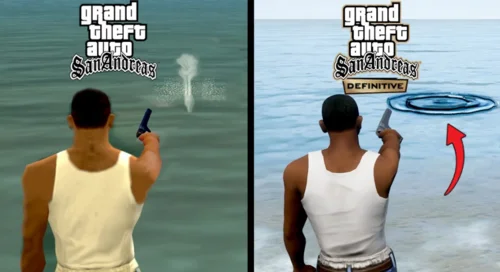
There is a huge difference between the original GTA San Andreas and the Definitive Edition when it comes to system requirements. The original version is designed for low-end PCs, while the Definitive Edition requires much more powerful hardware due to improved graphics and a modern game engine. Below is side by side comparasion table you can read it.
🖥️ GTA San Andreas vs Definitive Edition Requirements
| Component | GTA San Andreas (Original) | GTA San Andreas Definitive Edition |
|---|---|---|
| CPU (Processor) | 1 GHz Intel Pentium III / AMD Athlon | Intel Core i5-6600K / AMD FX-6300 |
| RAM | 256 MB | 8 GB |
| Graphics Card (GPU) | 64 MB (NVIDIA GeForce 3 or equivalent) | GTX 760 2GB / Radeon R9 280 3GB |
| Storage Space | 3.6 GB | 19–45 GB |
| Operating System | Windows 2000 / XP | Windows 10 (64-bit) |
| DirectX | DirectX 9 | DirectX 11+ compatible |
| Sound Card | DirectX compatible | DirectX compatible |
| Other | Keyboard & mouse | 64-bit system required |
⚡ Key Difference (Important for your article)
- Original GTA SA: Extremely lightweight → runs on very low-end PCs
- Definitive Edition: Modern remaster → needs ~30x more RAM + strong GPU (System Requirements Lab)
🚀 Quick Insight
- If your audience has low-end PCs → recommend original version
- If they want better graphics & modern gameplay → go for Definitive Edition
Which Version Should You Play?
If you have a low-end PC or laptop, the original GTA San Andreas is the best choice. It runs smoothly, requires very little hardware, and still offers the full gameplay experience.
If you have a powerful PC with a good graphics card, the Definitive Edition offers better visuals, improved lighting, and modern graphics—but it comes at the cost of higher system requirements.
👉 For most users, especially those with basic systems, the original version is still the best option for smooth and lag-free gameplay.
Best Settings for GTA San Andreas on Low-End PC
Even though GTA San Andreas runs on low-end systems, using the right settings can make a big difference in performance. With a few adjustments, you can reduce lag, improve stability, and get smoother gameplay on older PCs and laptops.
Graphics Settings Optimization
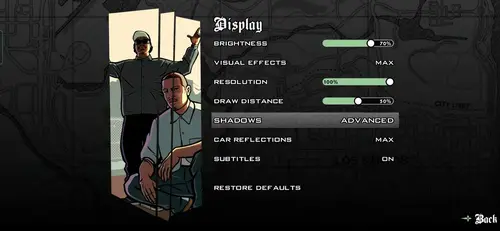
Lowering graphics settings helps reduce the load on your CPU and GPU.
- Set Visual FX Quality to low or medium
- Turn off Anti-Aliasing
- Reduce Draw Distance to a lower level
- Disable unnecessary advanced effects
These changes make the game run smoother, especially on systems with integrated graphics.
Resolution Settings
Resolution directly affects performance. Higher resolution means more load on your system.
- Use a lower resolution, like 800×600 or 1024×768, for better performance
- Avoid very high resolutions on low-end PCs
- Use full screen mode for better stability
Lower resolution can significantly increase FPS and reduce lag.
Performance Tips for Smooth Gameplay
A few simple tweaks can further improve performance:
- Close background apps before starting the game
- Run the game as Administrator
- Use Compatibility Mode (Windows XP) if needed
- Keep your graphics drivers updated
- Avoid installing heavy mods on low end systems
👉 With these settings and tips, GTA San Andreas can run smoothly even on very basic PCs without major lag or crashes.
Common Errors and Fixes (PC)
While GTA San Andreas PC runs smoothly on most systems, especially low end PCs, some users still face common issues after installation. These problems usually happen because the game was originally designed for older operating systems like Windows XP, so modern systems such as Windows 10 and Windows 11 can sometimes create compatibility conflicts.
The good news is that most of these errors are easy to fix with a few simple adjustments. If you’re facing issues like crashes, lag, or startup problems, you can check our detailed guide on GTA San Andreas common errors and fixes for PC & mobile. Also, if your game is stuck or not displaying properly, follow our step by step solution for the GTA San Andreas black screen fix, which works on both PC and Android devices.
GTA San Andreas Not Opening Fix
If GTA San Andreas is not opening on your PC, the issue is usually related to compatibility settings or missing system components. On modern systems, the game may fail to launch because it was not originally built for newer versions of Windows. Running the game as an administrator often solves the problem instantly.
In addition, enabling compatibility mode and selecting Windows XP (Service Pack 3) can help the game run properly.
Another common reason is missing or outdated DirectX files. Since GTA San Andreas relies on DirectX 9, installing or updating DirectX 9.0c can fix launch issues. If the problem continues, reinstalling the game ensures that all files are properly installed and not corrupted.
Mouse Not Working Fix
The mouse not working issue in GTA San Andreas is very common, especially on Windows 10 and Windows 11 systems usually happens because the game engine conflicts with modern input handling or runs at an unstable frame rate.
When the FPS becomes too high, mouse movement may stop responding during gameplay.
A simple fix is to enable V-Sync from the in game settings, which limits the frame rate and stabilizes input behavior. Running the game in compatibility mode can also help resolve the issue.
In some cases, players use small third party fixes that are specifically designed to solve mouse problems in GTA San Andreas. Once these changes are applied, mouse control usually works normally.
Crash on Windows 10/11 Fix
Crashes on Windows 10 or Windows 11 can occur due to compatibility issues, outdated drivers, or background software conflicts. Since GTA San Andreas is an older game, it may not always behave perfectly on modern systems without slight adjustments.
Running the game in compatibility mode, disabling full-screen optimizations, and updating your graphics drivers can significantly improve stability. It also helps to close unnecessary background applications before launching the game. These steps reduce system conflicts and allow GTA San Andreas to run more smoothly without random crashes.
GTA San Andreas System Requirements for Laptop Users
GTA San Andreas is one of the few games that runs smoothly on almost any laptop, even if the hardware is not very powerful. Since the game has very low system requirements, most laptops with basic processors, 2GB or more RAM, and integrated graphics can handle it without any difficulty.
Players using low-end laptops can still enjoy stable performance by keeping graphics settings on low or medium and closing background applications makes GTA San Andreas an ideal choice for users who do not have access to high-end gaming machines.
GTA San Andreas PC Requirements for Intel HD Graphics
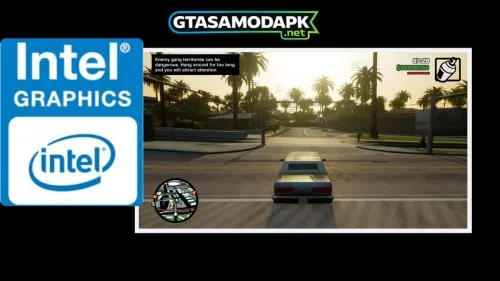
Systems with Intel HD Graphics can run GTA San Andreas without any major issues. The game only requires a basic 64MB graphics card, which means modern integrated graphics are more than capable of handling it. In most cases, players can enjoy smooth gameplay with decent visuals even without a dedicated GPU. Lowering certain graphics settings can further improve performance, especially on older Intel HD versions.
Is GTA San Andreas Still Worth Playing in 2026?
Even in 2026, GTA San Andreas is still worth playing because it offers an experience that many modern games cannot replace. The game has a memorable story, a huge open world, and some very interesting missions that still give players a strong sense of nostalgia.
From story driven moments to difficult challenges, missions like End of the Line and Supply Line are still talked about by fans today. Combined with its lightweight size and smooth performance on low-spec PCs, GTA San Andreas remains a timeless choice for both new players and longtime fans.
Can I run GTA San Andreas on 2GB RAM?
Is GTA San Andreas a low-end PC game?
How much GB is GTA San Andreas on PC?
Can GTA San Andreas run on Windows 11?
Do I need a graphics card for GTA SA?
Conclusion
GTA San Andreas continues to stand out as one of the best low-end PC games, thanks to its minimal system requirements and smooth performance across a wide range of devices. Whether you are using an older desktop, a basic laptop, or a system with integrated graphics, the game can run without requiring major hardware upgrades.
Understanding the GTA San Andreas system requirements for PC helps you avoid performance issues and ensures a better gameplay experience. With proper settings and simple fixes, the game works well even on Windows 10 and Windows 11. For anyone looking for a reliable and lightweight open-world game, GTA San Andreas remains a strong choice even today.

One Comment